Your Digital Keys: How to Create and Store Passwords Safely
Passwords, the proverbial "keys" to our digital lives. We know they are important, but how many of us truly understand how to create and manage them effectively? Personally, my password habits were a mess and I shudder when thinking about all the accounts I had with weak, reused passwords. My idea of a strong password was a word that meant something to me, with a number or two thrown in for good measure. There was also the "change the number" for each account strategy, which was just a slightly more sophisticated version of reusing the same password. I can't remember when the lightbulb moment happened, but it was probably a combination of hearing about data breaches, seeing the news about hacked accounts, and the advent of in-browser password managers that made me realise I needed to get my password game in order. Now I only remember one strong master password, the one that unlocks my password manager, MFA to keep it more secure, and then I let the password manager generate and store unique, strong passwords for all my accounts. It's been a game-changer for my digital security and peace of mind.
I recently presented a masterclass on this topic for the University of East London (UEL) Alumnus, and I wanted to share a written version of that presentation here as well, with some updates and additional insights based on the latest security trends and best practices. This Mo'ment is designed to be a practical guide for anyone looking to improve their password habits and digital security, whether you're a beginner or just need a refresher. So let's dive in and talk about how to create strong passwords, why they matter, and how to store them safely.
This isn't about scaring you but about empowering you with the knowledge and tools to protect your digital life. By the end of this guide, you’ll know how to create strong passwords, store them safely, and add the layers that actually protect you.
The first line of defence: Attackers Don’t Hack In, They Log In.
You've got different keys for different things in real life, right? You couldn't use the same key for your house, car, bike lock, and office. That would be a security nightmare. But online, many people do exactly that with their passwords. They reuse the same password across multiple accounts, which means if one account gets compromised, all of them are at risk. Read the key analogy again to understand why this is such a problem. Now, I know what you're thinking: "If I store all my passwords in a password manager, what if the password manager itself gets compromised?" That is a valid concern, but it's important to remember that password managers use strong encryption and security measures to protect your data. Plus, the risk of a password manager being compromised is generally much lower than the risk of your individual accounts being compromised due to weak or reused passwords. The key is to choose a reputable password manager and to use a strong master password, along with multi-factor authentication (MFA) for added security. Risks can only be mitigated, not eliminated.
Why Passwords Still Matter
Despite the rise of biometrics, passkeys, and other authentication methods, passwords remain the most common way we log in to our accounts. They are still the primary line of defence for most online services, and attackers know this. In fact, 81% of hacking‑related breaches in 2023 involved weak, default, or stolen passwords[1]. This means that if your password habits are weak, you're essentially leaving the door wide open for attackers to walk right in. What makes this easy for them? Weak habits like:
- Reusing the same password everywhere
- Using short, predictable patterns
- Storing passwords in notes apps or browsers
- Relying on personal information (birthdays, names, addresses)
- Sequential patterns (like "abc123" or "qwerty")
Strong passwords matter, but remembering dozens of them is impossible. Before we talk about how to create them, we need to talk about where they should live.
Password Manager. What is it good for?...Passwords!.
Before you create your master password, you need to decide where the rest of your passwords will live. This is where a password manager becomes essential. It is a secure vault that stores all your passwords, generates new ones, and fills them in for you when you need them. You only have to remember your one master password. Everything else is handled for you.
Before choosing a password manager, it helps to understand the different types available and how they fit into your digital life.
The Different Types of Password Managers
Password managers come in a few forms. Most people only encounter two types, but your device also includes system tools that behave like password managers behind the scenes. Here is the landscape in simple terms.
Browser Based Password Managers
These are built directly into Chrome, Safari, Edge and Firefox. They are convenient because they are already there. No installation. No setup. Autofill works immediately.
Pros:
- Very convenient
- No extra apps needed
- Syncs across devices signed into the same browser account
Cons:
- Limited features
- Locked to one browser ecosystem
- Historically weaker security controls
- If someone gains access to your browser profile, they may gain access to your passwords
Browser managers are a good starting point, but they are not ideal for long term security.
App Based Password Managers
These are dedicated tools like Bitwarden, Proton Pass, Keeper and 1Password. They are built for security first and convenience second. They work across all browsers and devices.
Pros:
- Strong encryption and security models
- Works everywhere
- Built in password generators
- Secure notes, vault organisation and breach monitoring
- Better support for passkeys
Cons:
- Requires installing an app or extension
- Slight learning curve
For most people, app-based managers are the best choice because they offer flexibility and strong protection.
OS Integrated Password Managers
Tools like Apple iCloud Keychain, Google Password Manager and Windows Credential Manager sit at the operating system level. They often feel like browser managers because they autofill in browsers, but they are actually system services.
They are convenient and secure for people who stay within one ecosystem. They are less flexible if you move between Apple, Android and Windows devices.
Comparison of Password Manager Types
Choosing the right password manager becomes much easier when you can see how the different types compare side by side. This table gives you a quick overview of the strengths and limitations of each option.
| Feature | Browser Based | App Based | OS Integrated |
|---|---|---|---|
| Where it lives | Inside Chrome, Safari, Edge or Firefox | Separate app and browser extension | Built into Apple, Google or Windows |
| Security strength | Basic | Strong | Strong within the same ecosystem |
| Works across devices | Only within the same browser account | Works everywhere | Best within one ecosystem |
| Password generation | Limited | Full featured | Basic to moderate |
| Extra features | Few | Many (notes, sharing, breach alerts) | Moderate |
| Ease of use | Very easy | Easy after setup | Very easy |
| Best for | Beginners and light use | Most people and mixed device users | People fully inside one ecosystem |
Which One Should You Use
Here is the simple guidance:
- If you live entirely in one ecosystem, OS integrated tools can be enough.
- If you want maximum security and flexibility, choose an app based manager.
- If you currently use a browser based manager, upgrading is worth it.
Here are a few reputable password managers to consider:
- Bitwarden, open‑source and flexible
- Proton Pass, privacy‑focused
- Keeper, enterprise‑grade controls
I use all three for different purposes, but if I had to recommend one, it would be Bitwarden. It is secure, user friendly and works everywhere.
Common Mistakes People Don’t Realise They’re Making
Even when people feel confident about their password habits, a few subtle behaviours quietly weaken their security. These are the ones worth catching early:
-
Thinking a password manager is too technical
The reality is that not using one makes your digital life far more complicated. -
Creating a strong master password and then weakening it later
This usually happens during a stressful login moment. Convenience should never replace strength. -
Letting old accounts sit with ancient passwords
Forgotten accounts are often the first to be breached. -
Trusting autofill without checking where it comes from
Browser autofill, operating system autofill and password manager autofill are not the same thing. -
Assuming you are not important enough to be targeted
Attackers do not target individuals. They target weaknesses. -
Believing complexity automatically means strength
A messy password is not automatically a strong one. Length and randomness matter far more.
This is not about blame. It is about awareness.
Catching even one of these habits early can prevent a cascade of problems later.
Why a Password Manager Changes Everything
Once you start using a password manager, your entire security posture improves immediately.
- It generates strong passwords
- It stores everything securely
- It syncs across devices
- It reduces human error
Your password manager will handle 99% of your passwords. But the one password you do need to remember — your master password — deserves special attention. It’s the only password you’ll type regularly, and it’s the one that protects everything else. One password to rule them all, and in the vault bind them.
The Anatomy of a Strong Password: Length is more important than complexity. .
Creating a strong password, especially one that you need to remember, can feel daunting. The common advice is to use a mix of uppercase and lowercase letters, numbers, and symbols. While this can help, it's not the most effective way to create a strong yet memorable password. The most important part of the password is that you need to be able to remember it, and the best way to do that is to use a method that combines length with randomness. The "three random words" method is a great example of this. It involves choosing three unrelated words and stringing them together to create a long, unique password.
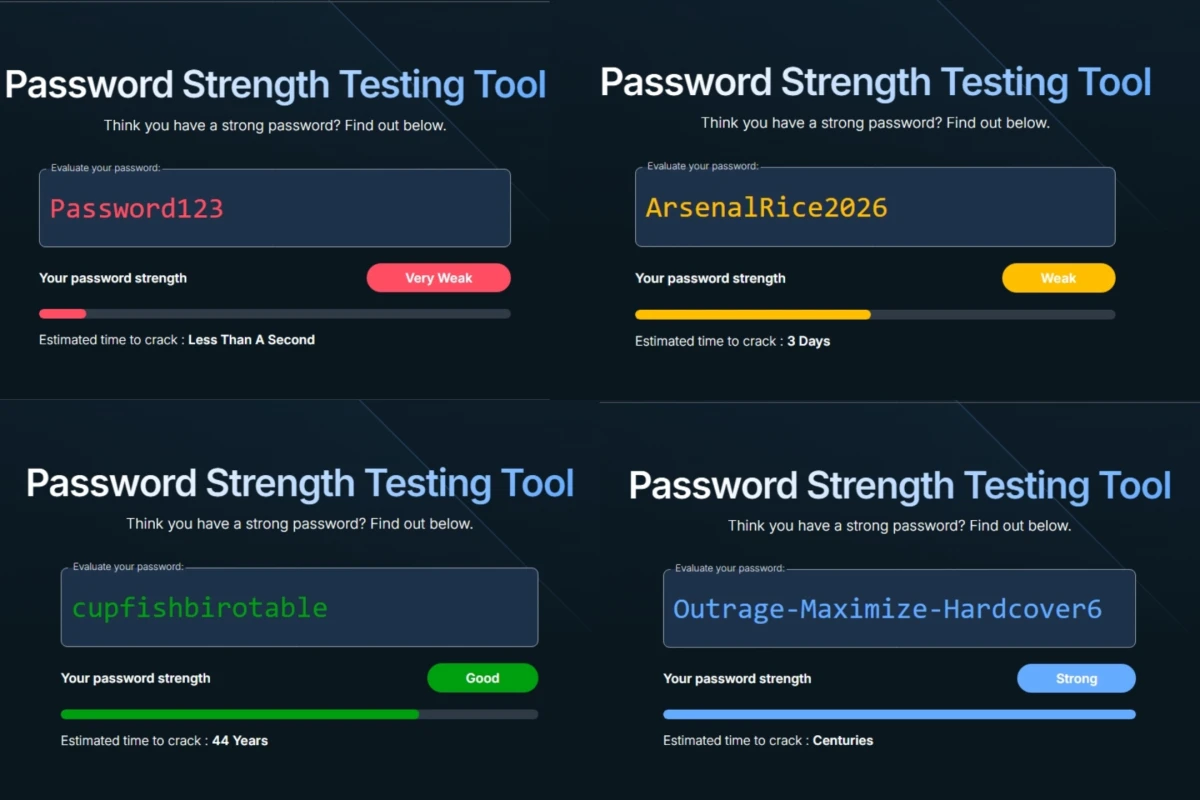
As you can see from the password strength comparison, a long password that is made up of random words is much stronger than a short password that uses complex characters. This is because the number of possible combinations increases exponentially with length, making it much harder for attackers to guess or crack the password. A good rule of thumb is to use at least 12 characters, and ideally 16 or more, to provide a good level of security. The three random words method is effective because it creates a password that is easy to remember but difficult to guess, without relying on predictable patterns or personal information. In short, a strong password should be:
- Easy to remember
- Hard to guess
- No personal clues
Here's the example again but in a table format: (I would remove it because it is redundant, but it took Bob a second to implement the table component and I want to show it off, so here it is!)
| Password | Strength |
|---|---|
| Password123 | Cracked in less than a second |
| ArsenalRice2026 | Predictable pattern; cracked in ~3 days |
| cupfishbrotable | Estimated 44 years to crack |
| Outrage-Maximize-Hardcover6 | Centuries |
Adding a number or symbol can increase the strength of the password, though it's not as significant as increasing the length and randomness. The key is to avoid predictable patterns, such as replacing "o" with "0" or "a" with "@", as these are well-known tricks that attackers will try first. Instead, focus on creating a password that is long, unique, and doesn't contain any personal information or common words. This way, you can create a strong password that is also memorable and easy to use.
Your Password Manager Is Ready. Now Let’s Generate the Rest. .
Now it is time for the part that actually transforms your security: generating the passwords themselves.
A password manager is only as strong as the passwords you feed into it. The good news is that modern managers can generate long, complex, truly random passwords for every account you use. This is where your security posture jumps from “better than average” to “genuinely strong.”
Once your master password is in place, your manager can generate the rest, but not all generation methods are safe. And this is where many people unknowingly weaken their security.
Avoid AI for Password Generation
AI tools are helpful for many things, but they are not a safe place to create or store passwords. Anything you type into an AI system is processed outside your control, which means you cannot guarantee where that information goes or how it is handled.
This is not just a privacy issue. It is also a technical one. AI models are built to predict patterns, not avoid them. Password security requires the opposite.
What the Research Shows
Irregular Research tested major AI models, including GPT, Claude and Gemini, to see how well they generate passwords[2]. The results were clear. AI generated passwords look strong, but they follow patterns that make them far easier to crack than they appear.
- Patterns Everywhere: Claude generated the same password (
G7$kL9#mQ2&xP4!w) 18 out of 50 times. More than half of all passwords began with predictable characters like G or 7. - Low Actual Entropy: A password that looked like it had 100 bits of entropy, which should take centuries to crack, actually had only 20 to 27 bits. That is the difference between “safe for a lifetime” and “cracked in seconds.”
- Real-World Risk: Coding agents like Claude Code and GPT based tools often generate passwords using the language model instead of secure methods, even when proper tools like
openssl randare available. - Why It Happens: AI models predict the most likely next character. True password security requires unpredictable characters. These goals cannot coexist.
The research team recommends never using AI generated passwords and instructing coding agents to use cryptographically secure methods instead.
So How Should You Generate Passwords
Your password manager already has the tools you need. Use its built‑in generator to create long, random passwords for every account. Aim for:
- at least 16 characters
- a mix of letters, numbers and symbols
- no patterns, no words, no personal references
Your manager will store them, sync them and autofill them. You never need to memorise them. This is the safest, simplest and most reliable way to protect your accounts.
So here's the simple takeaway:
Use AI to learn about security.
Use a password manager to actually generate your passwords.
With your passwords sorted and your manager doing the heavy lifting, you now have a solid foundation. The next step is adding the layers that turn good security into great security.
Beyond Passwords: Adding Layers That Actually Protect You.
As I mentioned earlier, passwords are the first line of defence, emphasis on "first". Only using a strong password is like locking your front door but leaving the windows open. It's a crucial step, but in the modern threat landscape, it's not enough on its own. Attackers have become more sophisticated, and they often target the user rather than trying to hack the system directly. This is why additional layers of security are essential to truly protect your accounts and data.
The good news is that there are effective and user-friendly options available that can significantly enhance your security without adding too much friction to your online experience. The second line of defence is Multi-Factor Authentication or MFA, and the future is moving towards passkeys, which are designed to be even more secure and user-friendly. Let's take a closer look at both of these layers and why they are important.
Multi‑Factor Authentication (MFA)
You've probably heard of MFA before, but it's worth reiterating how important it is. MFA adds an extra layer of security by requiring you to provide two or more pieces of evidence (factors) to verify your identity when logging in. This could be one of three types of factors:
- Something you know (like a password)
- Something you have (like a phone or hardware token)
- Something you are (like a fingerprint or facial recognition)
By requiring multiple factors, MFA makes it much harder for attackers to gain access to your accounts, even if they have your password. For example, if an attacker manages to steal your password, they would still need access to your phone or biometric data to log in, which adds a significant barrier to account takeover.
Here are some key points about MFA:
- MFA stops most account takeover attempts
- App‑based codes (from an authenticator app like Google Authenticator or Authy) or hardware security keys are best
- SMS codes are better than nothing but are weaker because texts can be intercepted or stolen via SIM‑swapping, so avoid them when you have other options
MFA is the difference between "they got my password" and "they still can't get in."
Passkeys, a promising future with a shaky present
Passkeys are a new authentication method that is designed to replace passwords altogether. They are a middle ground between traditional passwords and biometrics, offering a more secure and user-friendly way to log in to your accounts. The three main ideas behind passkeys are:
- They cannot be guessed in the way passwords often can (and are).
- The same passkey cannot be reused across different websites and apps (the way passwords can).
- You cannot be tricked into divulging your passkeys to malicious actors (the way passwords can).[3]
The main issue with passkeys right now is that their experience can be inconsistent across different platforms and services, some companies cough Google have implemented them in the worst possible way that it almost stopped me from using them at all. However, my password manager of choice (Bitwarden) has implemented passkeys in a way that is seamless and user-friendly, and I have been using them for all the services that support them. The good news is that passkeys are becoming more widely supported, and as the technology matures, we can expect to see a much smoother and more consistent experience across the board.
Passkeys represent the direction security is moving:
- Passwordless
- Phishing‑resistant
- Based on biometrics or device unlock
- Increasingly supported
Passkeys show a lot of promise for the future of authentication, but until they are universally supported and the user experience is consistent, it's important to continue using strong passwords and MFA as your primary means of protecting your accounts.
The Final Layer: Unique Emails.
This part is not for the faint of heart, but it's one of the most effective ways to protect your accounts and limit the damage if one of them gets compromised. The idea is to use unique email addresses or aliases for each of your accounts, rather than using the same email for everything. This way, if one account gets breached and your email address is exposed, it won't affect all your other accounts that use different emails. It also makes it much harder for attackers to impersonate you or gain access to your accounts through social engineering, as they won't have a single email address to target.
This goes beyond just security; it also helps with privacy and account management. By using unique emails, you can easily track where your information is being shared and identify which services are responsible for any leaks or spam you might receive. Many email providers offer aliasing features that make it easy to create unique email addresses without having to set up multiple accounts, so it's a practical and effective strategy for enhancing your digital security. The one I use for this is Proton Mail, which allows me to create unlimited aliases that all funnel into my main inbox, making it easy to manage while still providing the benefits of unique emails for each service. Other email providers also offer similar features, so it's worth exploring what options are available to you.
Using unique emails or aliases:
- Limits the impact of data breaches
- Makes impersonation harder
- Helps you trace where leaks come from
- Is easy to manage with aliasing features
It's a simple habit with outsized protection.
Every weak password is an open door. Close yours. .
Strengthening your digital security is not about becoming a cybersecurity expert. It is about adopting habits that respect the value of your identity, your data, and your peace of mind. Strong passwords, MFA, passkeys, and unique emails are not abstract technical concepts. They are practical tools that put control back in your hands.
Every small improvement you make, whether it is updating one old password, enabling MFA on one account, or creating one alias, is a step toward a safer and calmer digital life. Security is not a single action. It is a posture, a mindset, and a quiet commitment to protecting the things that matter.
You do not need perfection. You only need progress.
Choose what’s next
You made it to the end of this Mo'ment, so you're clearly interested in improving your digital security. That's great! The next step is to take action on what you've learned. It's one thing to understand the importance of strong passwords and MFA, but it's another thing entirely to actually implement these practices in your daily life. The good news is that you don't have to do everything at once. You can start with small steps and gradually build up your security habits over time. The key is to be consistent and make it a part of your routine. Here are some practical steps you can take to get started:
- Set up a password manager: Choose one that you trust and start using it to generate and store your passwords securely. My recommendations are a great way to start; they all have free tiers so you can try without any monetary commitment to see what works best for you.
- Review and update old passwords: Go through your accounts and update any weak or reused passwords with strong, unique ones generated by your password manager.
- Turn on MFA everywhere: Enable multi-factor authentication on all your accounts that support it, especially for sensitive accounts like email, banking, and social media.
- Start using passkeys where available: As more services support passkeys, make the switch to this more secure and user-friendly authentication method.
- Use unique emails for new sign‑ups: Create unique email addresses or aliases for different services to limit the impact of potential data breaches and make it easier to manage your accounts.
Treat your digital keys with care. Build habits that protect you even when you are not thinking about them. And remember, the goal is not fear. The goal is confidence. When you secure your accounts, you secure your future self.
Your digital life is worth that level of stewardship.
References
- Vibe Password Generation: Predictable by Design — Irregular Research (Feb 18, 2026)